Digital safety for the whole family

Protection
without panic.

TotalHeal keeps your computers, browsing, privacy and family safe — quietly, clearly and without scare tactics. Not just antivirus.

30-day full trialNo card neededNo browsing history collected
The TotalHeal app: real-time, web and ransomware protection are on and the device is protected
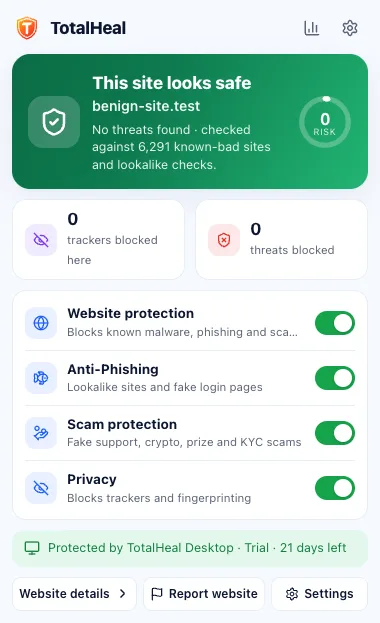
TotalHeal browser extension popup: this site looks safe

Screens from the TotalHeal app and browser extension. Numbers shown are sample data.

Our promise

No scareware. Ever.

No fake alarms, inflated threat counts or “your PC is infected” pop-ups.

No fake countdowns

If something is limited, we show the real number.

Your data stays yours

No browsing history, no ads, nothing sold. Stored in India.

Same price at renewal

No introductory price that quietly doubles next year.

One app, five layers

Everything that keeps a family safe online — in one calm place.

Device, web, privacy, identity and family protection work together, so you don’t juggle five apps.

Available now

Antivirus and real-time protection

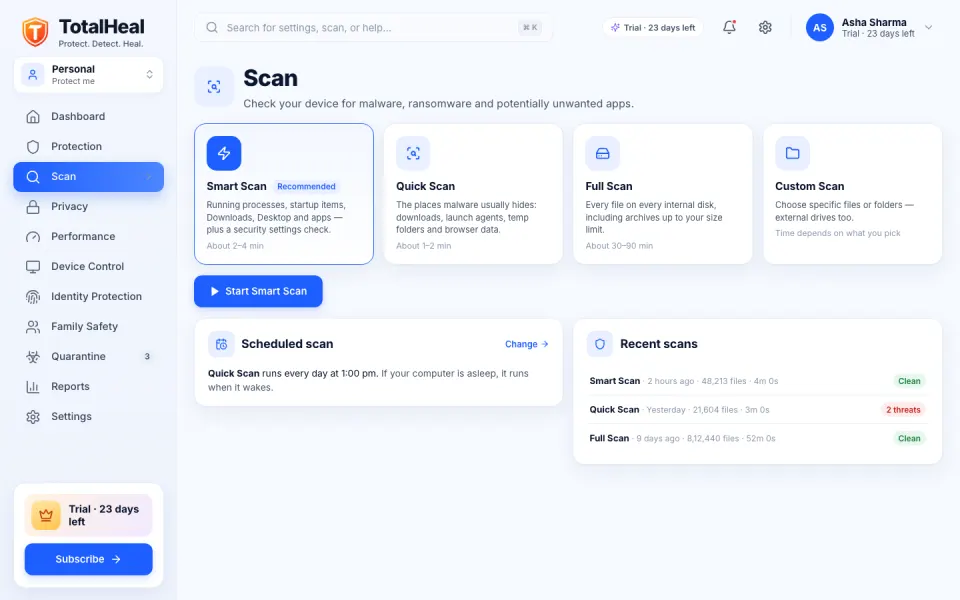
TotalHeal checks files as they are downloaded, written and opened, and scans your computer on a schedule you choose. It tells you plainly what it found and what it did about it.
  • Real-time file shield
  • Several engines, one verdict
  • Smart, quick, full and custom scans
  • Quarantine you can trust
Learn more about antivirus
TotalHeal Scan screen with Smart, Quick, Full and Custom scans
Available now

Ransomware shield

Ransomware tries to lock your photos and documents and then asks for money. TotalHeal watches your important folders and stops a program that starts rewriting them.
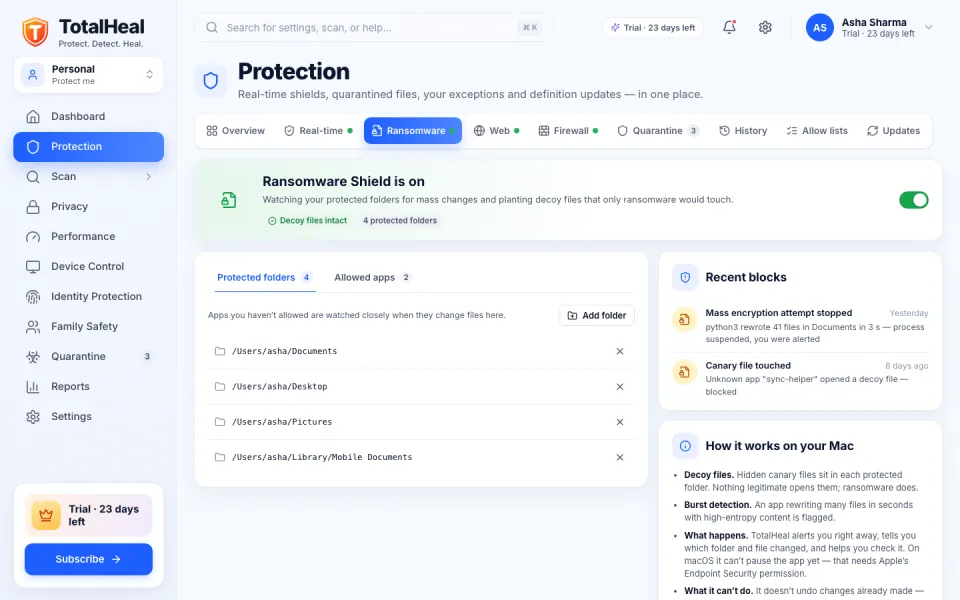
  • Decoy files
  • Burst detection
  • Suspend first, then ask
  • Protected folders and allowed apps
Learn more about ransomware shield
TotalHeal Ransomware Shield with protected folders and recent blocks
Available now

Web and download protection

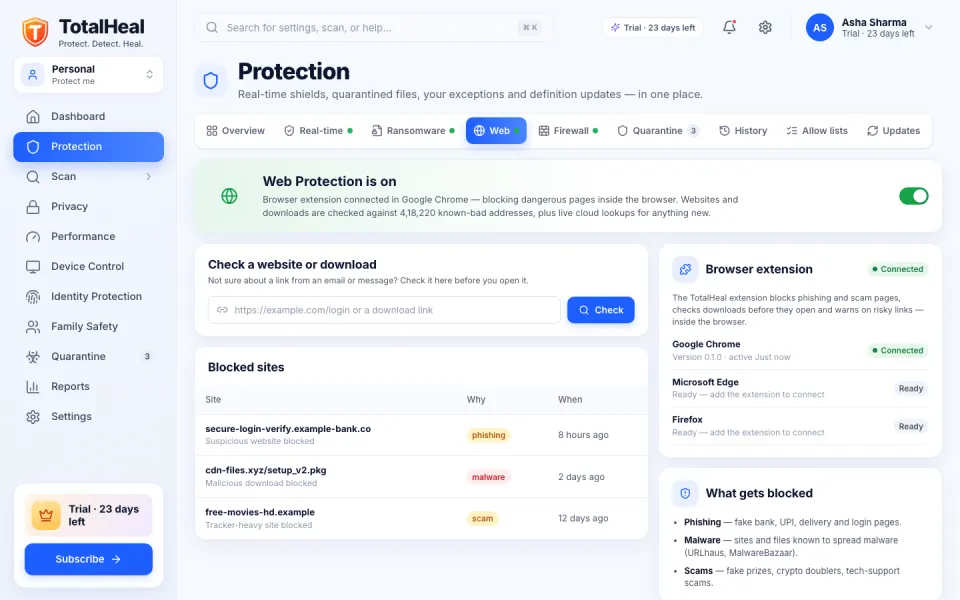
Most attacks start with a link. TotalHeal checks websites and downloads against a constantly updated list of known-bad addresses and spots lookalike domains built to fool you.
  • Known-bad sites blocked
  • Lookalike domains
  • Download checks
  • Check a link yourself
Learn more about web protection
TotalHeal Web Protection screen with a link checker and recently blocked sites
Available now

Privacy protection

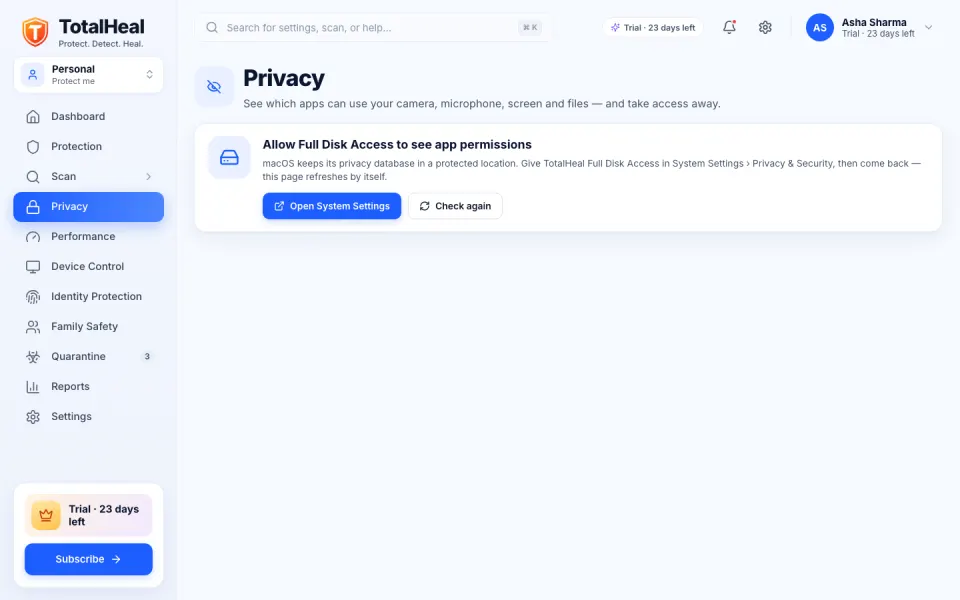
TotalHeal shows you, in one place, which apps can see your screen, hear your microphone, use your camera or read your files — and helps you take access away.
  • App permission audit
  • Plain-language risks
  • Tracker blocking in your browser
  • Webcam and microphone alerts Coming soon
Learn more about privacy
TotalHeal Privacy screen listing apps with camera, microphone, screen and file access
Available · more coming

Family protection

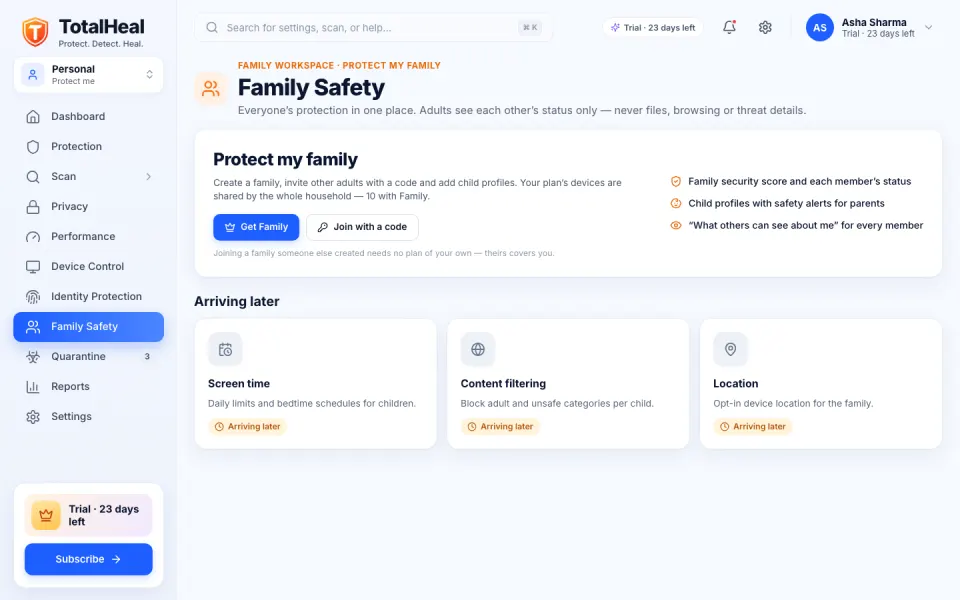
Protect everyone’s computers from one account. See at a glance which devices are protected — without spying on the adults in your home.
  • Shared device seats
  • Family dashboard Coming soon
  • Privacy between adults
  • Parental controls Coming soon
Learn more about family
TotalHeal Family Safety screen showing shared device seats and their protection status

Identity protection

Coming soon

We are building identity protection: alerts when your email, passwords or personal details appear in a data breach, with step-by-step fixes. Until it ships we show no results — we won’t guess or show sample data.

Email breach alerts · soonExposed passwords · soonDark-web monitoring · soonVPN · soonPassword manager · soonSecure DNS · soonMobile protection · soonCloud backup · soon
How it works

Protected in three steps. No card, no catch.

  1. 1

    Download and install

    Get TotalHeal for your computer. Setup takes a couple of minutes and runs a quick first scan.

  2. 2

    Your trial starts automatically

    Every new install gets 30 days of everything — everything unlocked. No card, no account needed to start.

  3. 3

    Subscribe when you’re sure

    Choose a plan or activate a product key. If you don’t, protection pauses on day 30 — your quarantined files always stay accessible.

“Your TotalHeal trial has ended. Protection is paused — subscribe to turn it back on.”

  • Real-time protectionPaused
  • Scans & definition updatesPaused
  • Your quarantined filesAlways accessible
  • History, settings & product keysAvailable
  • Turn protection back onSubscribe or activate a key
Browser extension

A second pair of eyes before you click, type or pay.

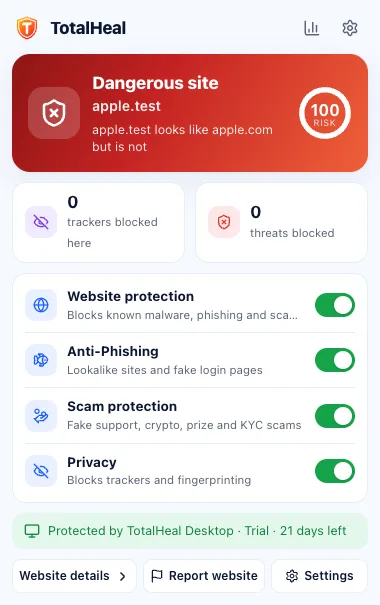
The TotalHeal extension spots fake login pages, scam shops and dangerous downloads in Chrome, Edge and Brave — and explains what it found in plain words.
  • Fake-login and phishing blocking for banks, UPI, delivery and government look-alikes
  • Banking & payment mode with extra checks on card and UPI pages
  • QR and clipboard checks — see where a QR code really goes
  • No browsing history — only the site, verdict and rule for warnings, kept on your device
How the extension worksStore listings coming soon
Extension popup warning that a site is dangerous
Extension popup showing a site looks safe
Founder offer

Be one of our first 1,00,000 customers.

Everything in Personal, for our first 1,00,000 customers. Your founder price stays locked at every renewal.

  • Everything in Personal on 3 devices
  • Price locked — renew at the founder price for as long as you stay
₹499/ year

or ₹999 for 3 years · 18% GST added at checkout

Plans

Honest prices. Same price every year.

Prices in INR per year. 18% GST is added at checkout. Renewal is the same price — no introductory discount that jumps later.

Compare every feature

Signed, verified updates

Every update and definition file is cryptographically signed and checked before TotalHeal uses it.

How we protect updates

Built and hosted in India

Made by Freaquer Corporation in India, with account data stored on servers in India, under the DPDP Act 2023.

Privacy policy

Works when you’re offline

Protection runs on your device. If our cloud is unreachable, TotalHeal keeps protecting you and never blocks normal sites.

How protection works
Questions

Good questions, straight answers.

Is there a free version of TotalHeal?
No. TotalHeal is a paid product with an honest 30-day trial: every new device gets everything for 30 days, with no card. After 30 days, protection pauses until you subscribe or activate a product key. Your quarantined files always stay accessible. There are no ads and we never sell your data.
How does the 30-day trial work?
Every new device gets 30 days of everything automatically. You don’t need a card or even an account to start. After 30 days, protection pauses until you subscribe or activate a product key — we tell you clearly, we never charge you by surprise, and your quarantined files always stay accessible.
Will TotalHeal try to scare me into buying?
No. We never show fake or inflated threat counts, fake countdowns or “your PC is infected” pop-ups. During the trial we only suggest subscribing when it is genuinely relevant, at most once a week per topic, and you can dismiss it.
Which devices are supported?
The TotalHeal desktop app is built for macOS (Apple Silicon and Intel), Windows and Linux, with macOS first. The browser extension is for Chrome, Edge and Brave first. Mobile protection is coming soon.
What data do you collect?
Only what protection needs: device health, protection status and threat detections (file fingerprints, not file contents). We do not collect your browsing history. Account data is stored in India. See Trust & security for the full list.
Can I use one plan on several computers?
Yes. Personal covers 3 devices, Family 10 and Ultimate 20. Sign in with the same TotalHeal ID on each device and manage them from your account.
How do I activate a product key?
Open TotalHeal on your device and go to Account › License, or sign in at totalhealsecurity.com/account and choose License. Keys look like TH-XXXXXXXX-XXXXXXXX-XXXX-XXXX.

Your digital life. Protected.

Try every layer for 30 days. No card, no sign-in needed to start.